You're sitting at home with your phone in one hand, trying to learn where your loved one is being held while family members ask what happens next. Someone may be driving toward a detention center with identification and paperwork, while an out-of-state cosigner wonders whether a signature can be completed remotely. In that moment, every delay feels longer than it should.
Electronic document exchange can replace much of the physical paperwork that once required repeated trips, waiting rooms, fax machines, and manual data entry. For a bail bond, that means an agent can send documents securely, a cosigner can review and sign them from an approved device, and the completed package can move toward the jail without requiring everyone to stand at the detention center. The process still depends on the jail, the court, the bond conditions, and the accuracy of the information provided, but digital transmission removes avoidable friction.
The Reality of Modern Bail Processing
Years ago, a family member arranging a bail bond often had to travel to an office, complete several paper forms, copy identification, sign each page, and wait while an agent reviewed the file. If the cosigner lived in another state, the process could become even harder. A missing page or unclear signature might send the documents back for correction, adding more time while the defendant remained in custody.
Today, a remote cosigner may receive a secure invitation, review the agreement on a phone or laptop, upload requested identification, and complete the required signatures without traveling to Colorado. That doesn't guarantee an immediate release, because detention facilities follow their own procedures and some arrests involve additional holds or court requirements. It does mean the family can begin the bond process immediately instead of waiting for every participant to arrive in person.
Practical rule: Ask the agent what the jail requires before signing anything. Fast transmission helps only when the documents are complete, accurate, and acceptable to the parties handling the release.
The change reflects a much broader business shift. Electronic document exchange evolved from earlier electronic data interchange, or EDI, systems that transferred structured business documents such as purchase orders and invoices directly between computers, as described by Electronic Data Interchange market background. Large organizations use that structured approach because computers can process consistent fields more reliably than people retyping information from paper.
The same principle helps in an urgent bail situation. A family member provides the defendant's information, the agent prepares the required documents, and the cosigner receives a controlled path to review and sign. Instead of asking a stressed person to interpret a stack of forms in a crowded office, the agent can guide them through each document and identify anything that still needs attention.
For a plain-language overview of what happens after an arrest, review the jail release process. Keep the defendant's full name, date of birth, booking details if available, and your own contact information nearby when you call. Clear information at the beginning gives the agent a better chance to prepare the right documents without unnecessary back-and-forth.
Understanding Electronic Document Exchange
Electronic document exchange is more than sending a PDF by email. It's a method for moving business documents between authorized people and systems in a form that preserves meaning, structure, and accountability.
Think of it as a universal digital language. A bail application might contain names, addresses, obligations, payment information, signatures, and other fields. If every document uses a predictable structure, the receiving person or system knows where to find each item. That reduces the risk that someone will manually rekey information into another system and introduce an error.
The basic pieces
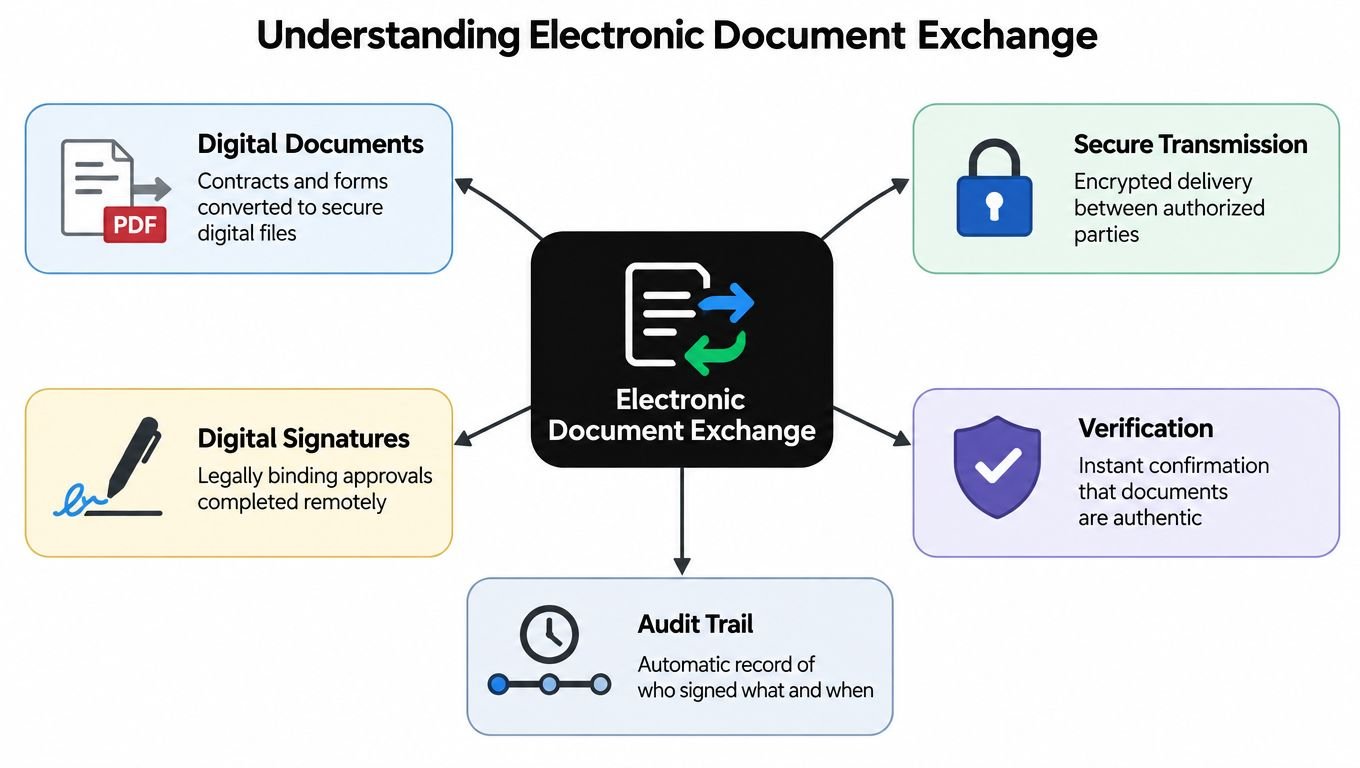
A useful exchange usually includes several connected parts:
- Digital documents contain the application, indemnity agreement, payment record, or supporting material in an electronic format.
- Structured fields identify what each piece of information means, rather than leaving everything in free-form text.
- Transmission controls send the document to the intended participant through an approved channel.
- Verification steps help confirm that the right person is accessing and signing the file.
- Records of activity preserve information about document versions, approvals, and completed actions when the platform supports those functions.
Enterprise EDI standards show why structure matters. ANSI ASC X12 is the primary framework in North America, while UN/EDIFACT is widely used internationally. These standards define the layout, codes, syntax, data elements, segments, and transaction sets or messages that allow different systems to interpret the same document consistently, according to Oracle's explanation of EDI standards.
Bail paperwork may not use the same transaction sets as a manufacturer or a hospital, but the underlying lesson is the same. A document should move through the workflow without forcing each person to guess what a field means or copy the same information repeatedly.
Teams designing these workflows can also learn from document ingestion for support teams, particularly when they need to collect information from different file types and route it to the right reviewer. For a cosigner, the practical result is simpler: open the invitation, verify the information, read the obligations, sign where required, and submit the documents through the provided process. A broader explanation of the role of digital records in bail arrangements is available through electronic documentation in bail.
Security and Legal Considerations for Remote Signing
A remote signature should never be treated as a casual click. A cosigner is accepting financial and legal responsibilities, so the process should make the signer's identity, the document version, and the completed approval as clear as possible.
A professional workflow may use identity verification, controlled access, document timestamps, audit records, and protected transmission. These features serve different purposes. Identity checks help confirm who is signing. Access controls limit who can open the file. An audit trail can show what document was presented and when an action occurred. None of these features excuses a signer from reading the agreement carefully.
Security is a process, not a single feature
Paper can be misplaced, copied, damaged, or altered without an obvious record of who handled it. Digital systems can create their own risks if an invitation is forwarded, a password is shared, or a signer uses an unsecured device. The right question isn't whether a document is “digital” or “paper.” Ask how the agency verifies identity, protects the transmission, stores completed records, and handles a correction.
The legal position also depends on the applicable jurisdiction and the facts of the transaction. International digital trade guidance warns that cross-border projects can fail when domestic laws, accreditation requirements, user needs, and neighboring jurisdictions aren't considered together. It also identifies reluctance to recognize foreign electronic trade documents and differences in legal frameworks as barriers to global data sharing, as discussed in UNCITRAL materials on electronic trade and legal interoperability.
That matters for an out-of-state cosigner. Remote signing may be operationally convenient, but the agency still needs to follow Colorado requirements and its own procedures for accepting the signer and the documents. A cosigner should ask whether a particular form must be witnessed, whether an identification document is acceptable, and how signed copies will be delivered.
Before you sign: Confirm the defendant's name, the bond amount, your obligations, payment terms, collateral language, and any court-related instructions. Ask for clarification before submitting the signature, not after.
Practical help with preparing and signing a PDF is available through Documind's tips for signing documents. For bail-specific questions about required identification or remote execution, consult the electronic signature requirements provided by the agency handling the bond. If anything in the agreement is unclear, pause and ask the agent to explain it in ordinary language.
Step-by-Step Digital Onboarding for Cosigners
A digital bail application is easier when you treat it like a checklist rather than a conversation happening in the middle of a crisis. Have your phone charged, use an email address or mobile number you can access immediately, and gather the information the agent requests before opening the signing link.
Start with accurate information
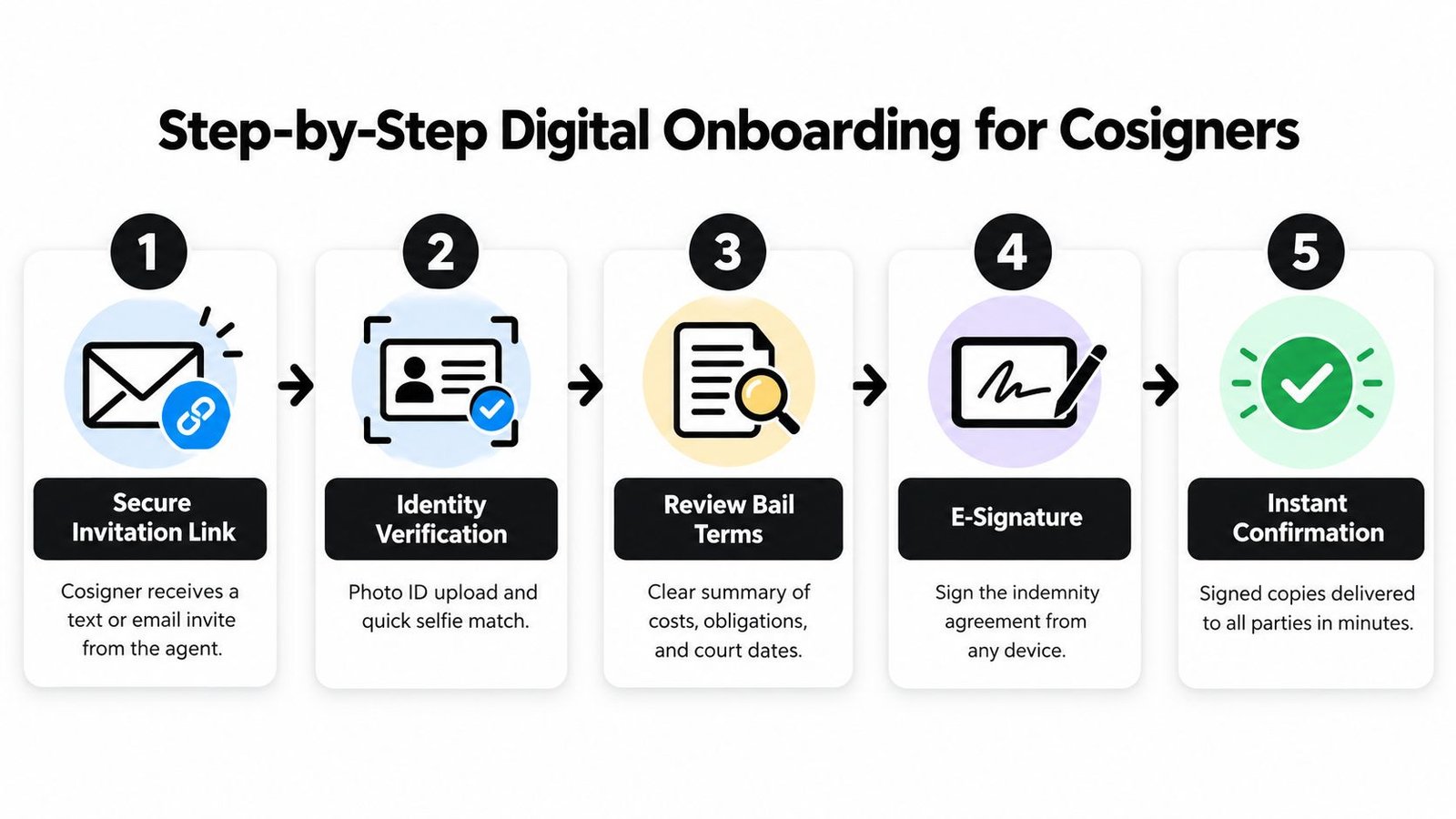
1. Contact the bond agent. Provide the defendant's full name, date of birth, location of detention if known, and any booking or case information available. Tell the agent where you are located if you're signing from outside Colorado. That helps the agent explain which documents you'll receive and how the remote process works.
2. Open the secure invitation. The agent may send an electronic invitation by text or email. Use the link from the expected sender, and don't forward it to another person. If the message looks unusual or asks for information unrelated to the bond, call the agency using a verified phone number before proceeding.
3. Complete identity verification. You may be asked to upload a photo ID or provide other information needed to confirm your identity. Take clear photographs in good lighting, make sure all edges of the ID are visible, and check that your legal name matches the information in the application.
4. Review the agreement carefully. Read the premium, payment arrangement, indemnity obligations, collateral provisions, and instructions connected to court appearances. Electronic document exchange makes delivery faster, but it doesn't make the agreement less important. A fast signature is useful only when the signer understands what they're accepting.
5. Sign and submit. Apply the electronic signature exactly where directed, complete any required initials or acknowledgments, and submit the final package. Don't close the page before receiving confirmation unless the platform tells you the submission is complete.
The agent may request additional documents if the first upload is incomplete or unreadable. Respond promptly, but don't guess when a field is confusing. A short call can prevent a mistaken address, incorrect defendant information, or a rejected identification file.
This video offers a visual introduction to the kind of remote signing sequence a cosigner may encounter:
After submission, save the completed copies and confirmation message in a place you can reach later. For a direct online signing option, review contract signing online. If the defendant's release is urgent, tell the agent immediately about any deadline, scheduled court appearance, or known hold. The agent can explain what the digital paperwork does and what still depends on the detention facility.
Comparing Traditional Paperwork to Digital Workflows
The difference between paper and digital processing is easiest to understand by following the same cosigner through both paths. In the paper version, the cosigner travels to an office or detention facility, waits for documents, fills out forms by hand, and returns them for review. If a page is missing or a signature is unclear, the cosigner may have to repeat part of the trip.
In a digital workflow, the agent sends the documents electronically, the cosigner reviews them remotely, and the completed package returns through the same controlled process. The jail still has to accept and process the bond, but the family doesn't need to gather every participant in the same physical location.
| Feature | Traditional Paper Process | Digital Exchange Process |
|---|---|---|
| Access | Requires travel to an office or another physical location | Allows approved participants to access documents remotely |
| Identity materials | Copies may be made by hand or at a physical office | Identification can be uploaded through the designated workflow |
| Review | Paper pages are reviewed in person | Documents can be reviewed on a phone or computer before signing |
| Corrections | Missing pages may require another visit | The agent can identify incomplete items and request a new submission |
| Signatures | Wet signatures require physical document handling | Electronic signatures can be completed remotely when accepted |
| Delivery | Staff carry, scan, fax, or mail the paperwork | Completed files can be transmitted electronically to authorized parties |
| Recordkeeping | Copies may be stored in folders or filing cabinets | Digital copies and activity records can be retained in the platform or agency system |
The financial logic behind digitization is also clear in broader document operations. One electronic document exchange provider reported paper processing at about USD 1.30 per page, compared with about USD 0.25 per page for electronic processing, according to market background on EDI software. That comparison doesn't establish the price of a particular bail service, but it illustrates why organizations have moved away from repetitive paper handling.
The goal isn't to make a stressful situation feel more technical. The goal is to remove avoidable travel, copying, and waiting so people can focus on the defendant's release requirements.
Digital exchange isn't automatically better in every circumstance. A person without reliable internet access may need another option, and a jail may require a particular delivery method. The responsible approach is to use electronic tools where they fit, confirm acceptance with the agent and facility, and keep the cosigner informed at each stage.
How Express Bail Bonds Speeds Up Releases
A Colorado family needs more than a signature platform. It needs an agent who can explain the bond, identify the documents required, coordinate with the detention facility, and remain available when the situation changes. Express Bail Bonds is a licensed Colorado agency based in Denver that serves detention facilities statewide and offers electronic applications, payments, and contract documents.
The agency is available 24/7 by call or text at 720-984-2245. Its process is designed for families and out-of-state cosigners who need to complete paperwork remotely, while the agent handles the next steps required for a surety bond. The company doesn't post cash-only bonds and instead focuses on surety solutions.
Colorado's standard premium is 15%, and bonds over $5,000 may qualify for 10% with an approved cosigner, according to the information provided on fast-action bail bonds. Ask the agent to explain the exact premium, payment arrangements, collateral requirements, and any conditions before you sign.
Local service pages can help if the arrest occurred near Jefferson County or Centennial. Use the Jefferson County bail bond information or the Centennial bail bond information to reach the appropriate service details. Electronic document exchange can shorten the paperwork stage, but release timing remains subject to the jail's procedures and any legal hold.
Call or text Express Bail Bonds at 720-984-2245 for help starting a Colorado surety bond and completing the paperwork remotely. Visit Express Bail Bonds to begin the digital process, review available guidance, and get clear instructions for the next step.