It's 11 p.m. Your loved one has been arrested, you're in another state, and the fastest option appears to be an online bail agreement. You open the document on your phone, sign electronically, upload identification, and send everything back within minutes. The private agreement may be complete, but that doesn't automatically mean every court or detention-facility document is ready for use.
That distinction matters in urgent bail situations. A signature that works for a private contract may not satisfy a court's filing rule, an affidavit requirement, a notarization requirement, or a jail's intake process. Colorado treats electronic filing as an authenticated process, but the correct method depends on the document, the signer, the filer, and the receiving authority.
Why Your Electronic Signature Might Not Be Enough for Court Documents
A family may sign a bail bond agreement electronically from a laptop in another state, while a separate release authorization must be handled according to Colorado court or detention-facility procedures. Those documents may look similar, but they serve different legal purposes. One records an agreement between private parties. The other may become part of a judicial or custodial process.
The federal framework explains why. In the United States, electronic signatures became broadly recognized through UETA, approved in 1999 as a model state law, and ESIGN, enacted in 2000 and effective October 1, 2000. Together, they generally prevent a signature or record from being denied legal effect solely because it's electronic. However, ESIGN expressly excludes court orders, notices, and official court documents, including briefs, pleadings, and other writings required in judicial proceedings. Those materials are governed primarily by court rules, filing systems, and procedural requirements, as explained in this legal overview of electronic signature laws.pdf).

Private agreement versus court submission
A digital bail contract can often be signed through a secure online process. That does not answer whether a court will accept the same signature format on a filing, declaration, or authorization. Courts may accept typed names, scanned signatures, platform-generated signatures, or account credentials, but the permitted method varies by jurisdiction and document type.
Practical rule: Treat every document as its own requirement. Ask who receives it, who must sign it, whether notarization applies, and whether an original must be retained.
Families also encounter trouble when a correctly signed document is sent to the wrong person for filing or delivered without required supporting records. If you're dealing with service, notices, or paperwork that may not have been handled correctly, review the guidance on court papers served incorrectly. For broader background, PDFWix's understanding electronic signature laws can help explain the contract side, but it doesn't replace the receiving court's rules.
Understanding Colorado Electronic Signature Laws and Court Rules
Colorado's electronic-filing system recognizes that an authenticated electronic submission can function as a signature. Under the Colorado Courts E-Filing User Agreement, the filer's user ID and password, combined with the typed, scanned, or digitally imposed name in the signature block, serve as that person's signature on electronically filed court documents.
That rule is important because it ties the signature to more than the visible mark on a PDF. The account, the credentials, the signature block, and the authorized filing action work together. The same combination generally satisfies related signature requirements unless a federal, state, or local law or court rule specifically requires an original signature.
Why ESIGN doesn't control every court document
UETA and ESIGN provide a foundation for electronic transactions, but court filings operate under procedural authority. A court may prescribe its own filing platform, account requirements, signature format, retention duties, service rules, and authentication process. A detention facility may impose separate intake requirements that aren't answered by either federal electronic-transaction law or a court's e-filing rule.
That's why an electronic signature court documents workflow must begin with classification. A private bail agreement, a court-filed motion, a declaration, and a notarized authorization aren't interchangeable merely because each appears as a digital file.
Colorado's rules also preserve exceptions for original signatures. An affidavit, declaration, verification, or other document requiring notarization may need additional formalities even when the filing itself is electronic. Before signing, compare the document against the applicable electronic signature requirements and confirm the receiving authority's current procedure.
The Three Types of Electronic Signatures and When Each Works
People often use “electronic signature” as if it describes one method. In practice, three common approaches create different records and fit different workflows.
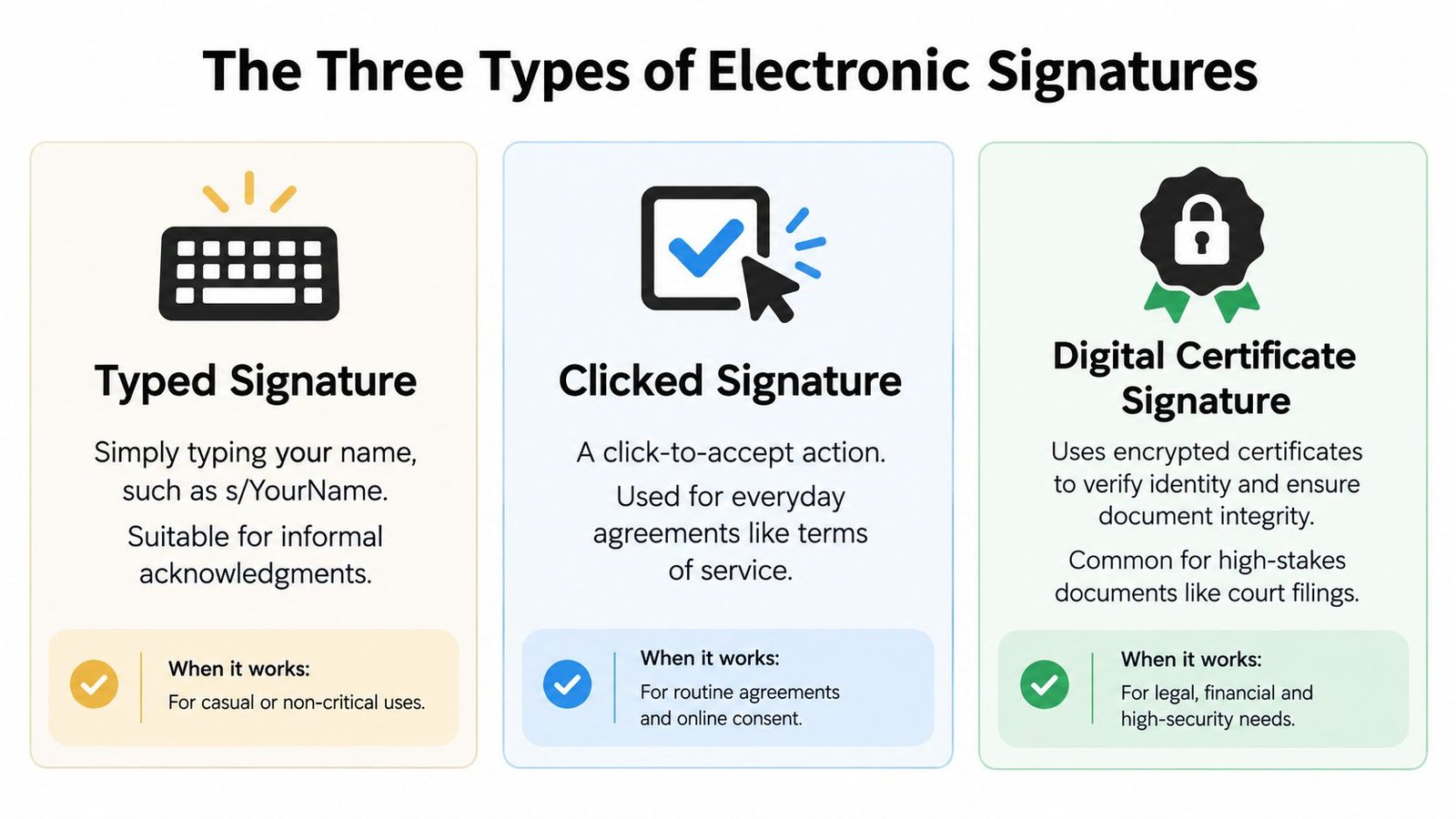
Typed signature
A typed signature may appear as /s/ Jane Smith, a typed name, or a name inserted into a signature block. Colorado court procedures define /s/ Name as a symbol representing the signature of the person whose name follows it. For certain e-filed and e-served documents, that format can satisfy the signature requirement after the required signatures have been obtained on paper.
The important safeguard is retention. The filing party must keep the original or scanned signed document and make it available for inspection if the court or another party requests it. A typed name alone isn't a substitute for authorization, an underlying original when required, or a secure filing account.
Scanned original
A scanned original preserves evidence that someone signed an actual paper document. The signer prints the document, signs it in ink, and returns a scan or photograph for electronic handling. This can work well when a rule requires an original signature but permits the filing party to submit an electronic copy.
It adds a physical step, so it's slower than a fully digital workflow. It also creates a responsibility to preserve the paper document and produce it if challenged. A scan should show the complete signature page and any required notary section clearly.
Platform-generated signature
A platform-generated signature records an affirmative signing action through an electronic service. Depending on the platform, the record may identify the signer, capture signing events, preserve the document version, and show when the document was completed. That audit trail can be valuable when a private agreement's authenticity or timing matters.
It still may not satisfy a court or jail that requires a particular signature block, notarization, original paper signature, or authorized filing account. Use the method that matches the receiving authority, not the method with the most convenient interface.
If you're unsure how to complete a digital signing request, follow the platform's instructions in this guide on how to sign an eSign document. Don't forward court credentials or ask another person to submit a filing under your account.
Which Documents Accept Electronic Signatures in Colorado Courts
The fastest way to avoid a rejection is to classify the document before signing it. The table below is a practical starting point, not a substitute for the specific court, clerk, or detention facility's instructions.
| Document Type | Accepted Signature Method | Original Required |
|---|---|---|
| Private bail bond agreement | Electronic platform signature may be accepted by the contracting parties | Usually not for the private agreement, but preserve the completed electronic record |
| Routine e-filed court document | Authorized e-filing account with typed, scanned, or digitally imposed signature, including /s/ Name where permitted | Retain an original or scanned signed document when the rule requires it |
| Affidavit or declaration | Follow the applicable court rule, often with an original signature and required execution formalities | May be required |
| Notarized authorization | Signature method must comply with the notary and receiving authority's requirements | May be required, depending on the document and rule |
| Jail or detention-facility release paperwork | Follow the facility's designated process and accepted signature format | Confirm directly before relying on an electronic copy |
The distinction between a contract and a filing is the one most often missed. A private document may be enforceable between the parties, while a court submission can still be rejected because the wrong person filed it, the original wasn't retained, or notarization was missing.
For a plain-language explanation of digital records and their practical use, review this resource on electronic documentation. Then ask the receiving authority one direct question: “Will this exact document, signed this exact way, be accepted for this exact purpose?”
How Express Bail Bonds Handles Electronic Signatures for Remote Cosigners
Remote cosigners usually need two things at once, speed and clarity. A workable process lets the cosigner review bail contract documents electronically, upload identification, sign from a phone or laptop, and complete payment remotely when appropriate. It also separates that private contract from any court or detention-facility paperwork that requires a different execution method.
A careful bail workflow identifies the signer, confirms the cosigner's relationship and responsibility, collects the required identification, and preserves the completed electronic records. If a separate paper signature, notarization, or facility-specific form is needed, the agent should identify that requirement instead of assuming the online contract covers everything.
The signer and the filer may be different people
An out-of-state relative can sign a private bail agreement remotely, but that doesn't automatically authorize the relative to file documents in the defendant's court case. Colorado permits non-attorneys to e-file only into their own case and expressly says a person can't e-file for someone else. That rule affects relatives, caregivers, bondsmen, and office staff who are helping under pressure.
For additional context on remote cosigning, see whether a cosigner can be out of state. The safe approach is to confirm who is authorized to submit each document, use the correct account, and avoid sharing login credentials.
A digital signature can move the contract process forward, but release still depends on the bond, the court's conditions, the jail's procedures, and the documents that each authority accepts.
Before relying on a completed PDF, make sure the receiving office has the full document and any required audit information. A signed file that cannot be tied to a specific signer, version, or authorized submission may create questions at the worst possible time.
Verification Checklist Before Submitting Electronic Signatures
Use this checklist before sending any electronically signed bail or court-related document.
- Identify the recipient: Confirm whether the document goes to a bail agency, court clerk, attorney, or detention facility. Each may apply different rules.
- Name every required signer: Check whether the defendant, cosigner, attorney, witness, or notary must sign.
- Match the signature method: Determine whether the document permits a platform signature,
/s/ Name, scanned original, or ink signature. - Check notarization: A signature request doesn't replace notarization when the document or rule requires it.
- Retain the original: Keep the paper document or scanned signed version when Colorado procedure calls for retention.
- Verify filing authority: Confirm that the person submitting the document is authorized to file it through the correct account.
- Preserve the record: Save the executed document, signing time, signer identity information, document version, and audit trail.
- Confirm facility requirements: Ask the detention facility whether it accepts electronic copies and whether it needs a separate release form.
A verification service such as MANDATE verification system may help teams organize identity and document checks, but no software overrides a court's filing rule. Use technology to preserve evidence and reduce errors, then confirm acceptance with the authority receiving the document.
Common Misconceptions About Electronic Signatures in Legal Proceedings
Myth one, signing electronically means the entire process is electronic. A person may sign a private contract online and still need to print, sign, notarize, scan, or retain another document. Electronic execution and electronic filing are separate steps.
Myth two, any e-signature platform works for every document. A platform can create a strong audit trail and still fail to meet a court's required format. Court acceptance depends on the document and procedure, not just the technology.
Myth three, remote signing eliminates original signatures. Colorado procedures may allow an electronic filing while requiring the filing party to obtain and retain paper signatures. Affidavits, declarations, and notarized documents can carry additional requirements.
Myth four, forwarding a signed PDF to someone else for filing is harmless. Colorado permits non-attorneys to e-file only into their own case and expressly says they can't e-file for someone else, as stated on the Colorado Judicial Branch non-attorney e-filing page. A mismatch between the signer, filer, and account holder can create a procedural problem even when everyone acted in good faith.
Myth five, a typed name proves everything. A typed name may satisfy a permitted signature format, but authenticity also depends on authorization, identity, document association, timing, and preservation of the underlying record. The visible mark is only one part of the evidence.
Next Steps for Using Electronic Signatures with Colorado Court Documents
Start by separating the documents into two groups. Put private agreements, such as a bail contract, in one group. Put court filings, affidavits, declarations, notarized forms, and detention-facility paperwork in the other. Then confirm the signature and submission rule for each document before anyone signs.
Keep the completed electronic file with its audit trail and document version. Federal evidence practice requires enough evidence to support a finding that an electronic item is what its proponent claims it is. Federal Rule of Evidence 902(13) can make a record generated by an electronic process or system self-authenticating when a qualified person certifies that the system produces an accurate result, while Rule 902(14) addresses data copied from an electronic device or file through a certified digital-identification process. The federal evidence provisions are available through the United States Code evidence rules.
If you're arranging release for someone in Colorado, ask the bail agent which documents can be completed electronically and which require paper, notarization, or direct submission by an authorized filer. If the arrest occurred in Jefferson County, review bail bonds in Jefferson County and Golden. For an Arapahoe County arrest, the Centennial bail bonds resource can help you find the appropriate local contact.
Express Bail Bonds helps families and remote cosigners complete eligible bail contracts electronically while identifying paperwork that may require original signatures, notarization, or facility confirmation. Visit Express Bail Bonds to start the process and get direct guidance on the documents needed for release.